Creating User Control Functions in Visual Studio
User Control functions are basically Web User Controls (.ascx/ascx.cs files) that inherit from the class Composite.AspNet.UserControlFunction and by default are located in a folder structure below ~/App_Data/UserControls.
The folder structure dictates the User Control function's namespace and from the UserControls folder, you can create a deeper folder structure, matching the namespace you wish the function should belong to.
You should have at least one level of such folders since Experience Management requires that a function should belong to a namespace. If you create ascx/ascx.cs files directly in the UserControl folder, it will be assigned the namespace "UserControls" and will work, but you should take control of the namespace by creating your own subfolders.
For example: ~/App_Data/UserControl/Shop/Products/PopularProducts.ascx will by default become "Shop.Products.PopularProducts" in Experience Management.
Experience Manager Web Form extensions for Visual Studio
To be able to add User Control functions in Visual Studio's Solution Explorer under ~/App_Data/UserControls, install the Visual Studio 2012 extension that adds support for User Control functions (as well as Master Page based templates).
Download CompositeC1WebFormExtensions.vsix (for Visual Studio 2012 only)
Note The current version of the extension works with Visual Studio 2012 only.
Adding a User Control function in Visual Studio
To create a User Control function in Visual Studio:
| 1. | Make sure you've installed CompositeC1WebFormExtensions.vsix (see above). |
| 2. | Open Experience Management in Visual Studio. |
| 3. | In Solution Explorer, expand (your website) / App_Data / UserControl. |
| 4. | When required, create folders to serve as namespaces or use the existing ones. |
| 5. | Right-click the folder where you want to create the function and click Add / Add New Item. |
| 6. | In the Add New Item window, select C1 CMS User Control Function. |
| 7. | In the Name field, type in the name for your function and click Add. |
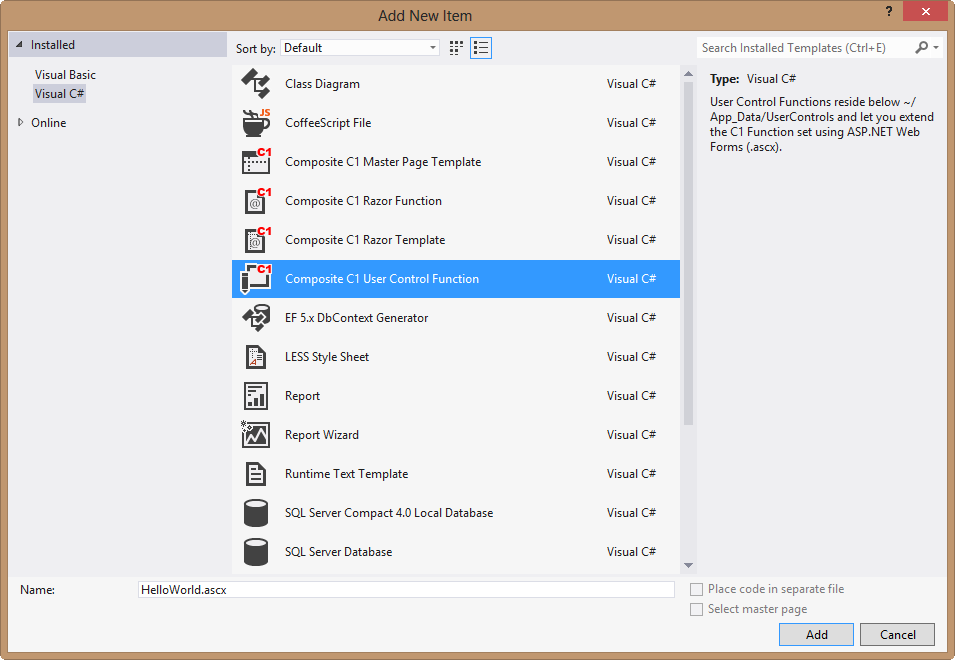
The new .ascx/.ascx.cs files will appear under the folder you've selected.
A bare-bones User Control function
If you create new files ~/App_Data/UserControls/Examples/HelloWorld.ascx and /HelloWorld.ascx.cs with the content below, you will get a new CMS Function named "Examples.HelloWorld" you can use inside the CMS Console:
HelloWorld.ascx:
<%@ Control Language="C#" AutoEventWireup="true" CodeFile="BareBonesHelloWorld.ascx.cs" Inherits="BareBonesHelloWorld" %>
<h1>Hello World!</h1>
HelloWorld.ascx.cs:
using System;
using Composite.Functions;
public partial class BareBonesHelloWorld : Composite.AspNet.UserControlFunction
{
    protected void Page_Load(object sender, EventArgs e)
    {
    }
}