Switching Stores
Depending on your user roles and permissions, you may have access to multiple stores in Mobile Store Fulfillment. You can switch store at any time using the hamburger menu.
To switch stores
| 1. | Tap the hamburger menu. |
| 2. | Tap the Change button. |
| 3. | Select a store from the list. |
| 4. | If you do not want to select another store, tap the Back arrow. |
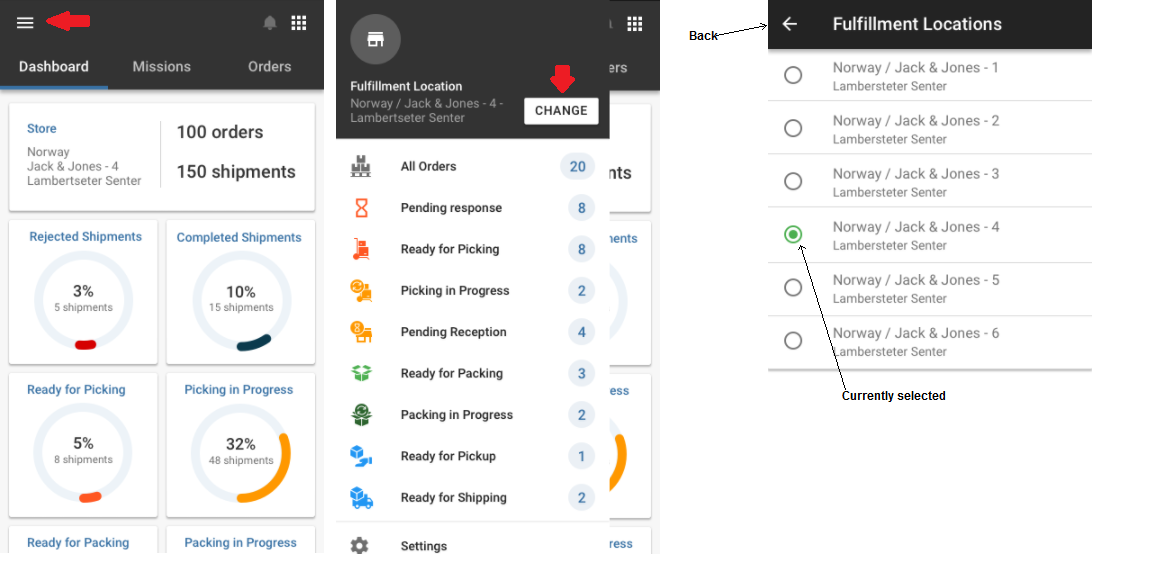
If you only have access to one store, only your store is displayed on the list. Select it by tapping it to begin.
REFERENCES
| • | Logging in to Mobile Store Fulfillment |