About the Dashboard
The Mobile Store Fulfillment application is divided into two main tabs: the Dashboard and an order display tab. The name of this second tab changes depending on the selected category. This tab is called Active when it displays active shipments currently handled by your store. It is called Offered when it displays shipments offered to your store as part of the Competition model.
The Dashboard provides KPIs to track the fulfillment progress within your store. It contains three sections:
|
•
|
Store: Information about the selected store. |
|
•
|
Productivity: A donut chart that displays Incoming, Pending, In Progress, Completed, Excluded and Late orders. |
|
•
|
Average Fulfillment Duration: The average time needed for orders to go from Ready for picking to a status that shows the store has completed the portion of shipment fulfillment assigned to it, such as Shipping Completed, Transfer Completed or Ready for Pick-up. This is a daily average, so when your store opens every morning, this section will contain no data. |
Store
The Store section provides the following information:
|
•
|
The name of the selected store. |
|
•
|
The number of active shipments assigned to your store (this number can include fulfilled shipments but also order shipments that are about to be fulfilled). |
|
•
|
The number of items included in the order shipments. |
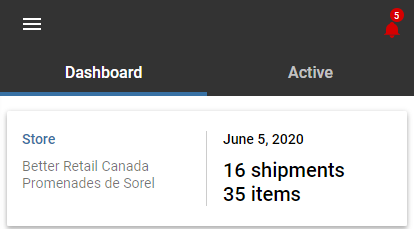
Figure 1 - Dashboard - Store
Productivity
The chart contained in this section uses colors to differentiate each category. The size of each area is proportional to the number of shipments contained in this category. Each category can represent multiple statuses. Tap a category to see the number of shipments it contains, expressed as a percentage of the total number of shipments handled by your store and as a x/y ratio.
|
•
|
Incoming (shipments that are currently being fulfilled by another location, but which will eventually be transferred to your store) |
|
•
|
Expired SLA (any shipment for which an SLA has expired but which will be picked up at your store and which, consequently, must be fulfilled by your store, regardless of its current status) |
|
•
|
Declined (shipments attributed to your store that you have expressly declined) |
|
•
|
Rejected (shipments attributed to your store that you have rejected during processing) |
|
•
|
Expired (shipments with expired SLAs that were reassigned to other stores) |
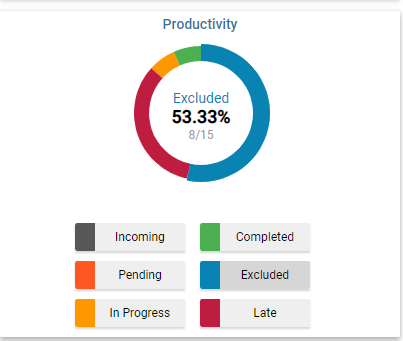
Figure 2 - Dashboard - Productivity
Average (avg.) Fulfillment Duration
The lower section of the dashboard displays the average time needed for orders to go from Ready for Picking to a status that indicates that the store has completed their assigned portion of the fulfillment process: Shipping Completed, Transfer Completed or Ready for Pickup. This is a daily average, so it is reset when your store opens.

Figure 3 - Dashboard - Average Fulfillment Duration