Merchandising Relationships
You can create relationships between categories and products, between products
Use the Merchandising tab to view, add, and delete relationships for the selected category. You can create relationships from products to other products, sub-categories, and categories.
These merchandising relationships are particularly useful when you want an accessory, bundle, replacement part, or product equivalent to be suggested or offered when related products are picked.
For example, you can create a relationship between a product and another product that are alike, suggest similar products that are more expensive, or create bundle offers that could interest your customers.
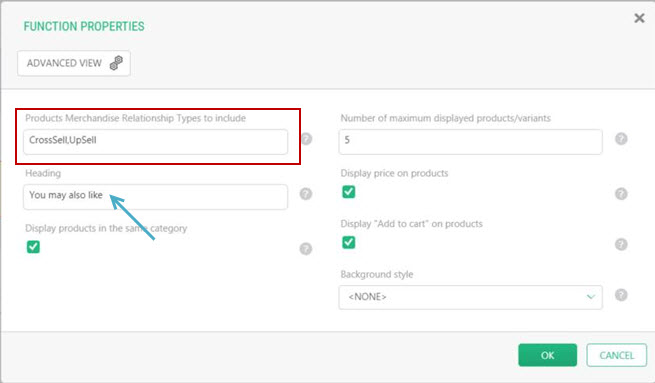
Tip: Experience Management can use relationships. For example, in the product details page, you can configure the code to display products that share specific relationship types. When configure, products with a relationship are displayed randomly in a "you may also like" section of the page.
Relationships type can be customized, a Product Administrator or Settings Administrator can add other relationship types if needed.
Merchandising types
|
Relationship type |
Description |
|---|---|
|
Specify Accessory when a complementary product can be interesting to purchase with this product. |
|
|
Specify Bundle when you want to group two or more products together, so that they can be sold as a package. They can be purchased separately, however, the web store will offer them as a bundle. |
|
|
Specify Replacement Part when you want to suggest a product component that can be purchased separately. |
|
|
Specify Product Equivalent when you want a comparison between two products or categories. |
|
|
Specify Up-Sell when you want to sell a more expensive product. |
|
|
Specify Cross-Sell when you want to create a relationship between similar categories and products that share related characteristics. |
Merchandising relationships can be defined in each scope. However, an inheritance mechanism exists that can be used between sales scopes and their dependent scopes: if no relationship is defined at the dependent scope level, the relationships defined at the sales scope level are applied. This means that, when retrieving the merchandising relationships at the dependent scope level, the relationships defined at the sales scope level are returned. This inheritance mechanism applies to products and categories and avoids having to redefine the relationships for each child scope.
Tip: Relationships
Link Modes
There are two links modes you can choose from when creating a relationship, one-way and two-way.
| • | One-way: The relationship is created from this product |
| • | Two-way: The relationship is bidirectional meaning that is from this product and to this product. |
For example, when creating a two-way (bidirectional) relationship, the primary product
ProductA has a cross-sell two-way relationship with CategoryB. CategoryB will also have a cross-sell two-way relationship with ProductA.
Important: when you remove a relationship that has a two-way link mode, the relationship to the product/category will still be effective. You must remove the relationship in both ways to completely delete the relationship.
For example: ProductA has a two-way cross-sell relationship to ProductB. When removing the relationship of ProductA, you must also remove the relationship in ProductB.
REFERENCES
| • | Creating relationships between products and Variants
|
| • | Creating a relationship involving categories |