Hostnames
In Experience Management, you can create and host multiple websites in one installation. Each website has its own homepage (the root page of the website).
By default, each site is accessed as:
http[s]://<hostname>[/<language code>]/<homepage>
For example: http://www.betterretail.com/Home or http://www.betterretail.com/Shop
You can however add an individual hostname binding to each of the website created in Experience Management.
http://www.betterretail.com/Home > http://www.betterretail.com
http://www.betterretail.com/Shop > http://www.betterretail-shop.com
Note: You can only use existing hostname bindings. You should configure them outside Experience Management (DNS Servers, bindings on IIS7 etc).
The hostname bindings as well as some other settings allow you to have shorter URLs to the pages on your website.
In addition, you can choose to:
| • | include or exclude the homepage title in the URL path (http://www.betterretail.com/Home/About vs. http://www.betterretail.com/About) |
| • | include or exclude the language URL mappings (http://www.betterretail.com/en-us/About vs. http://www.betterretail.com/About) |
| • | set up a custom Error 404 page URL |
| • | specify one or more hostname aliases (http://www.betterretail.com, http://betterretail.com) |
To add a hostname binding:
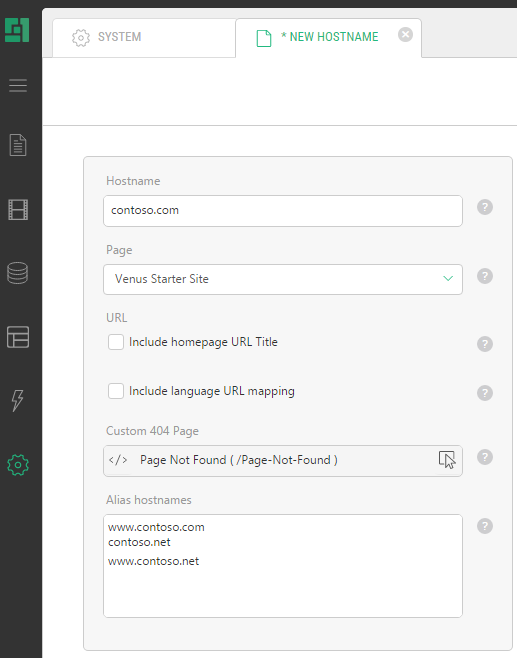
| 1. | In the System module, expand URL Configuration, select Hostnames, and click Add Hostname. |
| 2. | Specify the following values: |
| • | Hostname: The hostname you bind to your CMS Website (For example: ‘betterretail.com’) |
| • | Page: The root page (homepage) of the website. |
| 3. | When necessary, specify one or more optional values: |
- Include homepage URL Title: If checked, the URLs on the website will include the homepage title (
http://www.betterretail.com/ About>http://www.betterretail.com/Home/About, whereHomeis the homepage title) - Include language URL mapping: If checked, the URLs on the website will include the language mapping (
http://www.betterretail.com/About>http://www.betterretail.com/en-us/About) - Custom 404 Page: The hostname-specific URL to which all non-resolved requests are redirected. You can use a relative or an absolute path (For example: ‘/not-found’, '~/not-found' or 'http://www.betterretail.com/')
- Alias hostnames: A set of hostnames from which all requests redirected to the current hostname. It can be used, for example, for redirecting from ‘www’ to non-‘www’ hostnames or vice versa. (Start each alias at a new line.)
| 4. | Save the changes. |
| 5. | Restart the server (Tools | Restart Server). |
Note: Whenever you change something about the URL paths (include the homepage URL title, for example), make sure that the path to the custom 404 page is updated accordingly if the relative one is used.
Important Notes
- Hostnames in URLs are only active, when a "known" hostname is used. If you are contacting the website on an “unknown" hostname, the URL system will switch back to the "verbose path" mode and stop using hostnames. This ensures that a copy of a website (copied to a local host or a developer server) can be accessed without redirecting visitors to the live site.
- If you run Experience Management using the web server built into Visual Studio (named “Cassini”) a limitation in this server prevents hostnames from working. All request URL’s will be rewritten to “localhost” as the hostname, preventing Experience Management from seeing what was originally written.