Using Field Predicates Filter
To select multiple data items that meet some criteria you, use the FieldPredicatesFilter function:
|
1.
|
Select the FieldPredicatesFilter function for the Filter parameter. |
|
2.
|
Use the Composite.Utils.Predicates functions to filter on one or more fields. |
When you add the FieldPredicatesFilter function, it lists a number of parameters, each of which is a filter parameter for one field of the data type.
For example, if you have such fields in your data type as Id, Name, Email, Company, the FieldPredicatesFilter function will have such parameters as Id filter, Name filter, Email filter, Company filter.
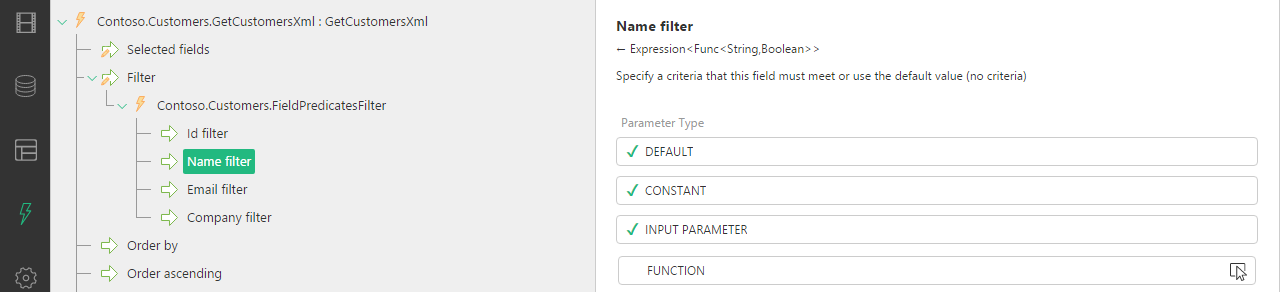
Setting criteria on multiple fields has them enforced.
To set a field filter parameter, you should use one of the predicate functions (Composite.Utils.Predicates). Each predicate function expects a function expression (expression tree) as its value and always returns a Boolean.
Each type of the field has its own set of predicates:
|
•
|
NullableDateTimeGreaterThan |
|
•
|
NullableDateTimeLessThan |
|
•
|
NullableDateTimeNoValue |
|
•
|
StringInCommaSeparatedList |
Each type has an “Equals” predicate, and if they are nullable, they also include a nullable version of the “Equals” predicate and a “NoValue” predicate.
Number-related types such as Decimal, Integer and DateTime have “GreaterThan” and “LessThan” predicates.
Strings and Guids also have the “InCommaSeparatedList” predicate.
Besides, the String type has “StartsWith” and “EndsWith” predicates.
For the data reference types, the Guid-related predicate functions are used.
The functions are self-explanatory but you can generate documentation for these predicates functions in the CMS Console.
|
1.
|
Select the field filter parameter of the FieldPredicatesFilter. For example: Email filter. |
|
2.
|
Click Function in the Parameter type box. |
|
3.
|
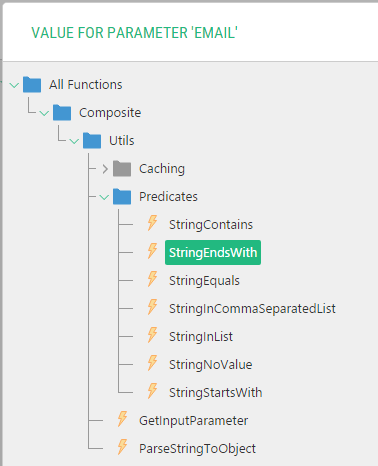
In the Value for Parameter window, select the predicate function. For example: Composite.Utils.Predicates.StringEndsWith |
|
4.
|
If the predicate function has parameters, set them, too. (For example, for the StringEndsWith, you should set the Value to Compare with parameter. For example: “gmail.com”. |
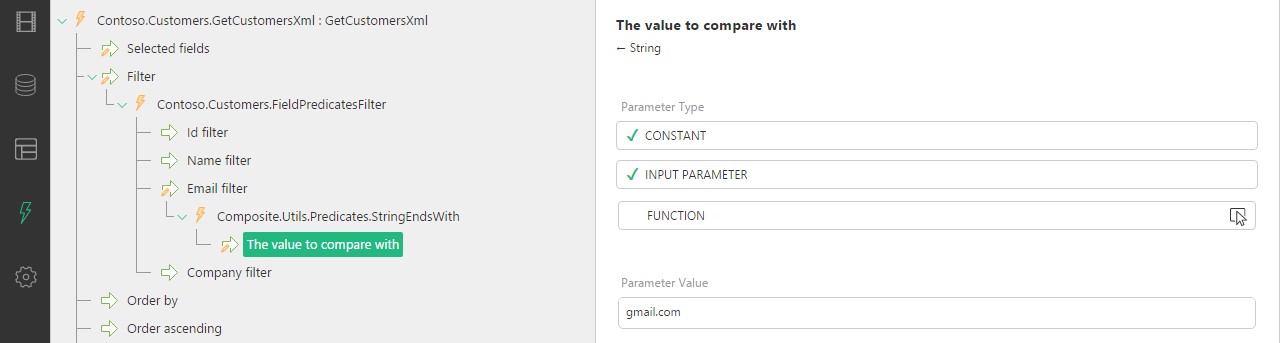
(In the example used with the steps above, these customers will be only retrieved whose email address is that of Google Mail.)