Captcha
EXPERIENCE MANAGEMENT > FUNCTIONS
A CAPTCHA is a common test used differentiate a human from a computer in interactions such as filling out web forms. The user is required to enter characters from a distorted image that randomly appears on the screen. The input is evaluated and if correct, the user is presumed to be human.
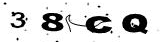
How to use the Experience Manager CAPTCHA functionality on ASP.NET pages
To implement the CAPTCHA functionality on ASP.NET pages you need to:
|
1.
|
Add the Captcha control to your web form and |
|
2.
|
Test the user’s input on a postback in the code behind. |
To use the Captcha control:
|
2.
|
Register the tag for the Captcha control. |
<%@ Register src="Captcha.ascx" tagname="Captcha" tagprefix="uc1" %>
This control includes a CAPTCHA image and a text input field.
|
3.
|
To test the user’s input, you need to use the Captcha control’s Validate method and then, check its IsValid property. |
This method validates the user’s input against the CAPTCHA.
IsValid
If true, the property indicates that the user’s input has been validated against the CAPTCHA; otherwise, false. Based on this property’s value, you can plan the further course of action on the form.
Sample ASP.NET Page with Captcha control
Let’s see some sample markup/code that illustrates how the Captcha control is used on the form.
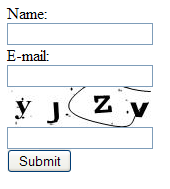
<%@ Page Language="C#" AutoEventWireup="true" CodeFile="CaptchaTest.aspx.cs" Inherits="CaptchaTest" %>
<%@ Register src="Captcha.ascx" tagname="Captcha" tagprefix="uc1" %>
<!DOCTYPE html PUBLIC "-//W3C//DTD XHTML 1.0 Transitional//EN" "http://www.w3.org/TR/xhtml1/DTD/xhtml1-transitional.dtd">
<html xmlns="http://www.w3.org/1999/xhtml" >
<head runat="server">
    <title>CAPTCHA test</title>
</head>
<body>
     <asp:MultiView ID="mlvMain" runat="server">
       <asp:View ID="viewInput" runat="server">
          <form id="form" runat="server">
            <div>
                Name:
                <br />
                <asp:TextBox runat="server" ID="txtName" />
                <br />
                E-mail:
                <br />
                <asp:TextBox runat="server" ID="txtEmail" />
                <uc1:Captcha ID="Captcha1" runat="server" />
                <asp:Button ID="btnSubmit" runat="server" OnClick="OnSubmit" CausesValidation="true" Text="Submit" />
                <asp:ValidationSummary id="validationSummary" runat="server" />
            </div>
            </form>
      </asp:View>
      <asp:View ID="viewSumbitted" runat="server">
        Submitted. Thank you for the participation!!!
      </asp:View>
    </asp:MultiView>
</body>
</html>
Download the source
In the markup above:
|
1.
|
The Captcha control was added with the registered tag prefix |
|
2.
|
The button ("btnSubmit") was added and the OnSubmit method was specified to be the handler for its OnClick event. |
|
3.
|
The fields (Name and Email) and use the MultiView control to present the user different views based on the validity of his/her input in the Captcha control. |
|
4.
|
The ValidationSummary control was added to show all the validation messages in one place. |
Add the OnSubmit method to CaptchaTest.aspx.cs and write code that will evaluate the user’s input for the CAPTCHA image.
using System;
public partial class CaptchaTest : System.Web.UI.Page
{
	protected void Page_Load(object sender, EventArgs e)
	{
		if(!IsPostBack)
		{
			mlvMain.SetActiveView(viewInput);
		}
	}
	protected void OnSubmit(object sender, EventArgs e)
	{
		this.Validate();
		if(!IsValid)
			return;
		mlvMain.SetActiveView(viewSumbitted);
		Captcha1.Validate();
		if (Captcha1.IsValid)
		{
			Captcha1.ResetValue();
			mlvMain.SetActiveView(viewSumbitted);
		}
		else
		{
			mlvMain.SetActiveView(viewInput);
		}
	}
}
Download the source
In the code above:
|
1.
|
We initialize the form to the default view (viewInput) |
|
2.
|
We added the OnSubmit method called when the Submit button is clicked. |
|
3.
|
Apart from validating regular form fields, in the OnSubmit method, we call the Validate method on the Captcha1 control on the form, which tests the user’s input against the Captcha cipher represented by the image and sets the IsValid property. |
|
4.
|
We checked the IsValid property of the Captcha1 control. The value (true/false) conditions our further course of action. |
|
5.
|
If the input is valid, we call the ResetValue method that resets the CAPTCHA cipher and present the other view to the user (viewSubmitted). |
|
6.
|
Otherwise, we present the viewInput view to the user. |