Configuring the Ability to Split Shipments
When using the Mobile Store Fulfillment application (MSF) to process shipments, a shipment may be assigned to a fulfillment center that appears to have the requested items in stock in the system but which, for various reasons, is unable to sell these items (for example, because they are damaged or being used as demos in store). Various options are available, depending on your business needs:
|
•
|
The fulfillment center must reject the shipment as a whole if it is not able to fulfill it completely and provide all the items requested. |
|
•
|
The fulfillment center can reject items, regardless of the quantity requested - which means if the client has requested two units of an item and the fulfillment center is only able to sell one of them, both units requested must be rejected. They will be added to a new shipment and assigned to another fulfillment center. |
|
•
|
The fulfillment center can reject only the missing units - which means if the client has requested two units of an item and the fulfillment center can only sell one, the missing unit will be added to a new shipment and assigned to another fulfillment center. |
Rejecting missing units or items results in what we call splitting shipments. Splitting options are located in the Order Management application.
Shipment splitting is only authorized in the Least Recently Used and Geographical Location routing models. In the Competition model, fulfillment centers that seize a shipment must be able to fulfill it entirely, or else they must reject it as a whole. For more information on order routing, see Order Configuration.
ORDER MANAGEMENT > ORDER > ADMINISTRATION
|
1.
|
Under Routing Providers, select LRU Routing Provider. |
|
2.
|
Click the Settings tab. |
|
3.
|
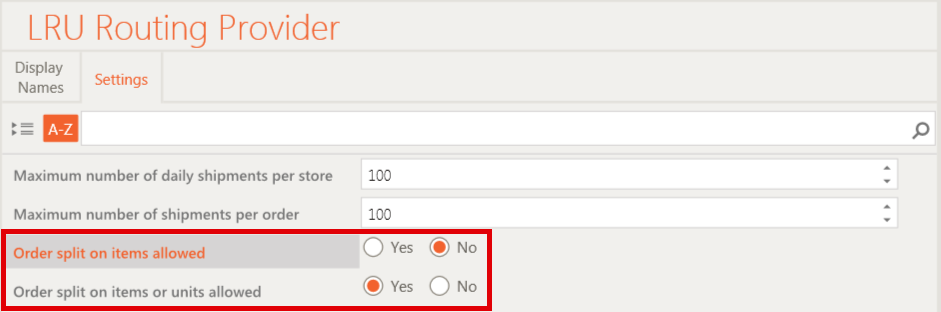
Make a selection according to your business needs: |
|
•
|
Order split on items allowed: If you select Yes here, the fulfillment center must be able to provide all the requested units of a given item. For example, if the client has ordered 3 black ACME brand t-shirts in a size Large, the fulfillment center must be able to sell all 3, otherwise they must reject all 3 units of the item. All 3 t-shirts will be added to a new shipment and assigned to a new fulfillment center. |
|
•
|
Order split on items or units allowed: If you select Yes here, the fulfillment center can enter partial quantities of a given item and reject the rest. For example, if the client has ordered 3 black ACME brand t-shirts in a size Large and the fulfillment center can only sell 2 of them, the missing t-shirt will be added to a new shipment and assigned to another fulfillment center. |
|
•
|
If both of these settings are showing No, shipments cannot be split and must be rejected as a whole if the fulfillment center cannot fulfill them entirely. |
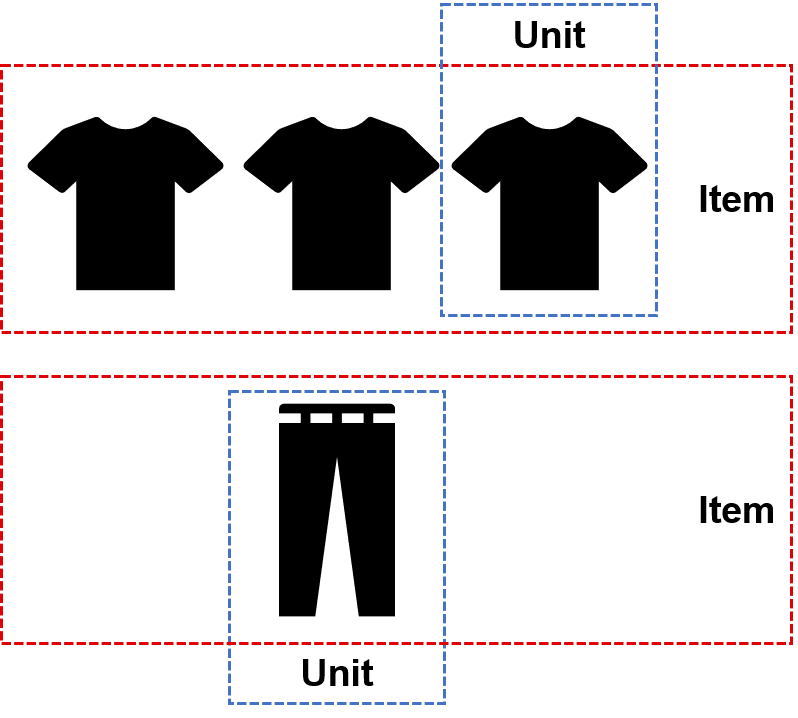
An item is equivalent to a product, regardless of the number of units ordered. When splitting on items is allowed, a store must provide all of the units ordered. A unit, on the other hand, is a single instance of an item. When splitting on units is allowed, it is possible to provide only part of the units ordered.
The order illustrated below contains 2 items, a black ACME brand t-shirt in a size Large and black Adidas pants in a size Medium. 3 units of the t-shirt and 1 unit of the pants have been ordered. If splitting on items had been selected, the fulfillment center would have to provide all 3 units of the black t-shirt or reject all 3.
|
4.
|
Click the Save icon in the bottom-right corner of the screen. |