Modifying Lookups
PRODUCT MANAGEMENT > ADMINISTRATION
Lookups are lists of choices that can be defined as attributes in Orckestra Commerce Cloud. You can add or edit existing lookups. Lookups cannot be deleted once created. Use this option to create lookup types for attributes to be used in profiles, products and categories.
For example, you could create a list of colors that correspond to apparel you usually sell. The list could include Black, Red, Green, Blue, Yellow or White.
When associated to an attribute and added to a product definition, a product editor can select one of the color from the list as the product attribute to describe the product.
When set as an attribute, you can set a default selection or allow multi-selections. For more information about setting a lookup as an attribute, see (insert link).
|
1.
|
In the Administration module, select Lookups. |
|
2.
|
Click the lookup that you want to modify in the list.
|
|
3.
|
Make the required modifications. |
|
a.
|
In the Base Settings tab, you can: |
|
•
|
Edit the lookup description. |
|
•
|
Edit the display names in the languages available in Orckestra Commerce Cloud. Click Show more languages to expand the multilingual list of display names. |
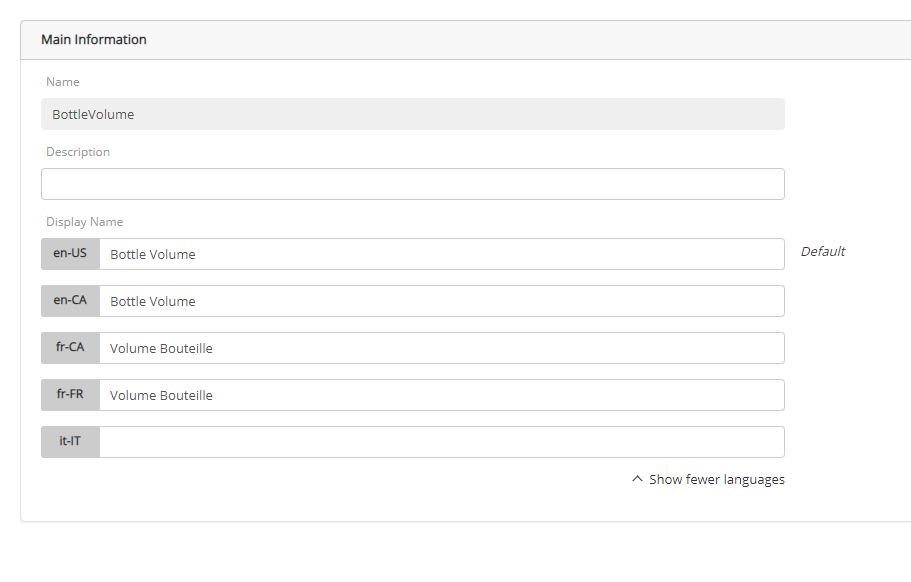
Figure 1 - Lookups - Display Name
|
b.
|
In the Lookup Settings tab, you can: |
|
•
|
Click the Value Name to edit its display name, status or sort order. Click Save to confirm your modifications. |
|
•
|
Set the Status for each value by toggling the indicator between Active and Inactive. |
|
•
|
Set the Sort Order for each value by entering a number in the column. |
|
4.
|
Click Save in the upper right corner to confirm your modifications. |
REFERENCES