Modifying Categories
PRODUCT INFORMATION > CATALOG
Modifying a category includes the following tasks:
|
•
|
Modifying the values of the category attributes such as the Display Name and Description. |
|
•
|
Defining merchandising relationships to other products and categories. |
Merchandising consists of creating associations between products and/or categories as a sales aid. Merchandising uses the MerchandiseType Lookup as defined by the Administrator. See Managing Lookups. For example, MerchandiseType could include Accessories, Bundled Items, Replacement part, or Cross- and Up-Sell options.
In Orckestra Commerce Cloud, products can be added to category using the multi-selection options.
Tip: While modifying a category, you cannot navigate away from the Category Details panel unless you either save or discard your changes.
Editing the category attributes
|
1.
|
In the Category Tree, click the menu options next to the category name. |
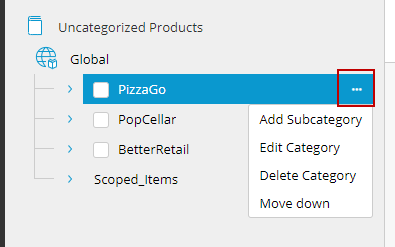
Figure 1 - Category options
|
3.
|
Make the required changes. |
Note: The Category ID and Definition Name are set when the category is created and cannot be modified.
REFERENCES